
Session Hijacking: How Account Takeovers Bypass MFA
Understand session hijacking through documented research, then use a practical checklist to contain account takeover and strengthen business access.
Sources reviewed 16 October 2026 · Public-source analysis

- A stolen session can give an attacker access after the legitimate user has completed MFA.
- Containment must address the device, active sessions, account recovery methods and delegated access.
- Passkeys and device-bound sessions address different risks; coverage depends on the service and implementation.
Your team enabled multi-factor authentication. Nobody remembers approving an unfamiliar login. Yet a business account has published a fraudulent message, changed its administrators or started spending money. One explanation worth investigating is session hijacking: misuse of the authenticated access that already exists after sign-in. It is a hypothesis to test against records, rather than a conclusion to draw from a missing MFA alert.
For businesses and agencies, the useful question is broader than whether a password was stolen. Which device established access? Which sessions and applications remain trusted? What can an intruder change before the platform asks for another check? This public-source analysis connects documented research with a practical response sequence. It does not diagnose an individual account or claim that every unexplained takeover involves stolen cookies.
What session hijacking actually means
A session lets a website remember an authenticated interaction across requests. Commonly, the browser presents a session identifier in a cookie. If a service accepts possession of that identifier as sufficient evidence of access, copying it may allow another party to act within the session's permissions. Expiry, server-side checks and additional authentication can limit what happens next. OWASP's session-management guidance explains these lifecycle controls.
The practical distinction is between proving identity at sign-in and maintaining trust afterward. MFA strengthens the first step. It does not automatically make every subsequent browser action safe. The permissions attached to the account also matter: an editor, an advertising administrator and an account owner can have very different powers. A response should map the affected business assets, rather than stop at the personal login that first raised concern.
The documented case: creators and malicious sponsorship offers
On 20 October 2021, Google's Threat Analysis Group published a report on campaigns it had tracked since late 2019. Targets received supposed collaboration opportunities, including software demonstrations. According to Google, running the offered software allowed malware to steal browser cookies. Compromised YouTube channels were then sold or repurposed for cryptocurrency scams. These are Google's historical findings, not incidents investigated by Halden. Read the original campaign report.
The chronology is instructive: an apparently relevant business conversation led to a software download, then to session theft and misuse of an established audience. The channel itself was the valuable distribution asset. This case does not establish that a particular sponsorship email today is malicious, nor does it provide a current measure of campaign prevalence. It shows why commercial teams need a safe route for evaluating unfamiliar software.
A session can outlive the sign-in check
Scroll the diagram horizontally, or read the text description below.
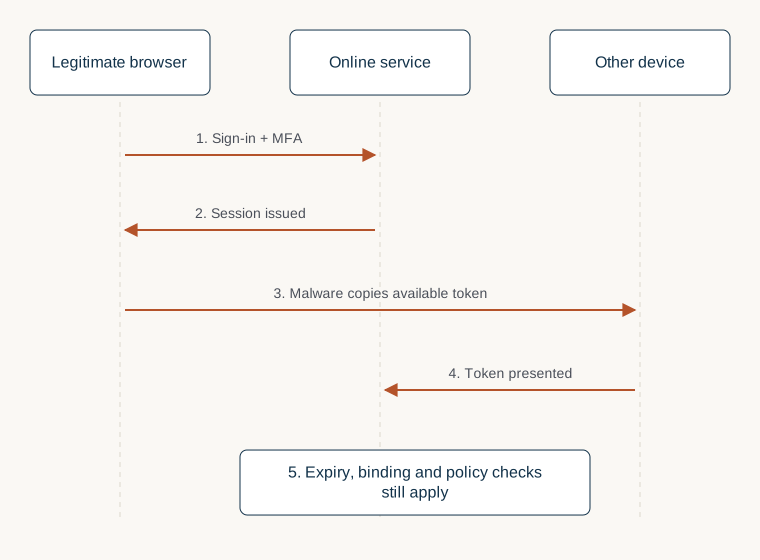
Read diagram as text
- The legitimate user signs in and completes the required authentication.
- The service issues an authenticated browser session.
- Malware on the device copies an available session token.
- Another device presents the copied token to the service.
- Access depends on expiry, binding and additional server-side checks.
Two routes that need different investigations
In the historical creator case, malicious software ran on the victim's device. Investigators would therefore want to understand what executed, when it ran and which signed-in profiles were present. Resetting an account while continuing to use a compromised computer can leave the underlying exposure unresolved. A security team should decide how to isolate and examine that device, using the organisation's established response process.
A different hypothesis involves a deceptive login interaction, where a person believes they are using a trusted service. The diagnostic questions change: what address was opened, what prompts appeared, and what was approved? A device infection and a deceptive login can produce overlapping symptoms, so the absence of an obvious malware alert does not identify the route. Preserve the original message and relevant times, and let the evidence narrow the explanation.
Neither hypothesis justifies experimenting with a stolen token or trying to reproduce access on someone else's account. The response objective is to restore authorised control and understand the scope. Your records can distinguish a user report, a platform alert and an analyst inference without exposing credentials in a shared incident channel.
Why convincing interface design still matters
A 2025 USENIX paper by Claudio Anliker, Daniele Lain and Srdjan Capkun studied phishing that imitated password-manager extension interfaces. Its relevance here is the trust boundary: website content can resemble an interface users expect to trust. The study concerns a particular experimental setup, not a finding that password-manager encryption failed or that password managers should be abandoned. Read the paper and study details.
Our operational recommendation is to practise the approved way of opening security tools and reaching account settings. A screenshot alone cannot establish that a prompt came from the browser or the service it resembled. Teams should give staff a short, independent verification route and permission to pause an urgent request. Training is more useful when it rehearses the actual workflow employees will use under pressure.
What device-bound sessions change
On 9 April 2026, Google announced public availability of Device Bound Session Credentials for Windows users on Chrome 146. Its description separates short-lived access cookies from a device-held key required for refreshing the protected session. The aim is to reduce the usefulness of copied cookies outside that device. Websites need supporting backend integration; a browser update alone does not establish coverage for every service. Google's announcement explains the design.
That announcement described macOS expansion as forthcoming. We do not treat it as proof of the current rollout on every operating system. A purchasing or security decision should check the application, browser, device and supported configuration actually in use. Device binding also does not remove the need to investigate an endpoint that an attacker can control directly. It changes one part of the trust model.
Do this first when access may be compromised
Choose an incident owner and use a known-good device for recovery. Open the provider's official website independently, rather than follow a recovery link in the suspicious message. Google's compromised-account guidance provides the appropriate account-specific starting point. If access is lost, use the provider's recovery process; independent advisers cannot promise restoration or bypass its ownership checks.
Record what you already know without delaying urgent containment. Useful starting details include the account identifier, discovery time, visible unauthorised changes and the last known legitimate activity. If a security team is available, tell it which device was used and whether software was opened. Avoid broad cleanup or repeated testing before that team has considered what evidence might be lost.
Contain account access and investigate the device
Scroll the diagram horizontally, or read the text description below.
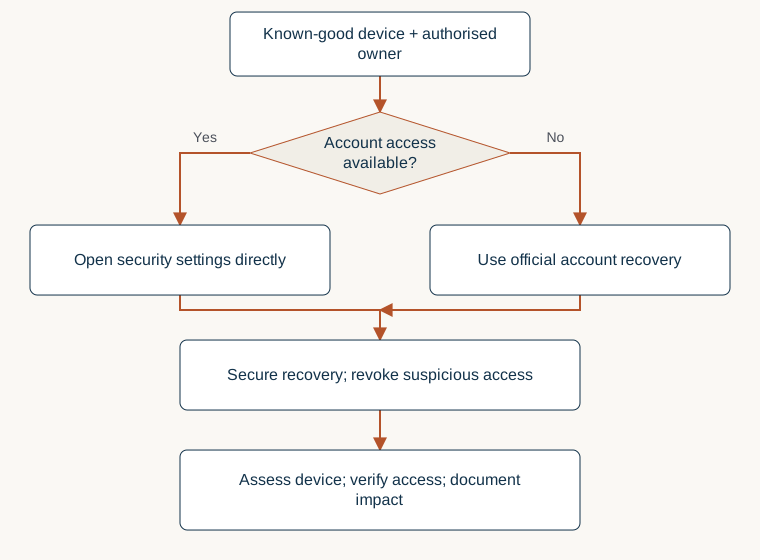
Read diagram as text
- Confirm the authorised owner and use a known-good device.
- Can the owner still access the account?
- Yes: open security settings directly. No: use the official recovery route.
- Secure recovery methods; revoke suspicious sessions and delegated access.
- Have the responsible team assess the potentially compromised device.
- Verify intended access, review business impact and record unresolved questions.
A containment checklist for business accounts
The following is Halden's suggested coordination checklist. Adapt the order to active harm and the provider's available controls. These steps are not a substitute for a responder's assessment of an infected device.
- Establish a safe communication route. Confirm who owns the account and who can authorise changes. If corporate email is affected, agree a separate, verified contact method.
- Secure recovery dependencies. Review the email account, recovery contact details and approved sign-in methods that can restore access to the affected service.
- End suspicious access. Use the platform's session and device controls, and confirm what its sign-out action actually covers. Document what was revoked and when.
- Review delegated permissions. Check connected applications, business partners, administrators and advertising access. Treat unexpected additions as findings requiring verification.
- Address the endpoint. Ask the responsible security team to assess the computer used during the suspected exposure before relying on it for fresh credentials.
- Check business impact. Review recent posts, messages, payment settings and campaigns. Involve finance promptly if unauthorised spending or changed payment instructions are suspected.
- Verify restoration. Confirm the intended owners can access the account and that suspicious permissions have not returned. Record unresolved questions for follow-up.
Changing a password remains useful, but it should sit inside this wider process. The FTC's recovery guidance also recommends signing out and warning contacts about account misuse. Follow the actual provider's instructions for the affected account; do not assume all services revoke every type of access in the same way.
Build an evidence timeline without collecting secrets
Start with four times: when the suspicious message arrived, when someone interacted with it, when unauthorised activity first appeared, and when the organisation became aware. Mark estimates as estimates. Keep original timestamps and their timezones alongside any normalised timeline. This helps avoid treating a delayed notification as the moment an attacker first gained access.
Preserve messages, available audit exports, support references and screenshots of unauthorised changes through approved storage. Record who collected each item and the account context in which it was visible. A screenshot can support what a user saw, but it may omit earlier activity or surrounding permissions. Note those limits rather than filling gaps with assumptions.
Do not paste cookies, passwords, backup codes or complete recovery links into tickets, public forms or general chat. If a responder needs sensitive material, agree the purpose, access restrictions and secure transfer method first. Evidence collection should help answer a defined question, such as whether an administrator was added, rather than accumulate unrelated personal information.
Prepare agencies and creators before the next incident
Use individually assigned access where the platform permits it, with a documented owner for each business asset. Map which agency, employee or contractor can grant further permissions. Review access at onboarding, role changes and offboarding, and rehearse what happens if the usual administrator is unavailable. The result should be a usable ownership map, not an inventory nobody can maintain.
Create a separate process for sponsorship demos and unfamiliar downloads. Commercial staff should know who can assess a file and what to do when a sender insists that warnings be ignored. Consider a managed evaluation environment chosen by the security team. Do not turn a production browser carrying valuable signed-in sessions into an informal software-testing workstation.
Keep MFA enabled and consider phishing-resistant sign-in methods supported by the service. Pair that with device management, software updates and a review of extensions. These controls address different parts of the problem. Ask service providers specifically about session expiry, revocation, sensitive-action checks and device-bound support instead of accepting a general statement that an account is protected by MFA.
Questions to ask during recovery
Does a missing MFA notification prove session theft? No. It is one observation. Other explanations include delegated access, an existing authorised session or a misunderstood platform event. Correlate account, device and application records before choosing a cause.
Will a password reset remove every attacker session? Do not assume so across services. Follow the provider's current guidance and review sessions, connected applications and recovery methods separately. Ask support to clarify any access that cannot be inspected or revoked through the account interface.
Should we delete the fraudulent post immediately? Active customer harm may require quick removal. Where feasible, preserve the post's identifier, content and timing first, then record the removal. Evidence preservation should run alongside containment, rather than become a reason to leave harmful content available.
Can a passkey replace device security? No. A stronger sign-in method does not make an already compromised endpoint trustworthy. Decide on device remediation and account recovery together, with the relevant platform and incident-response team.
Limitations and when to get help
This article synthesises public reports and general defensive practice. Halden has not reproduced the cited campaigns, examined a reader's device or verified an individual account compromise. Product support changes, and a documented mechanism is not a diagnosis. The cover is an AI-generated conceptual illustration; both diagrams are schematic explanations rather than observed account activity.
Escalate when an account holds customer information, controls paid advertising, belongs to several organisations or appears connected to a wider device compromise. Bring the relevant platform support team, your incident responder and the authorised owner into a shared plan. Use our social media security service overview to frame an access review, or start with the official recovery routes. For evidence handling, continue with our incident response evidence guide.
Sources and review notes
Accessed 16 October 2026. Reported findings remain attributed to their original authors. Publication dates below are shown where established.
- Google TAG: creator-targeting cookie theft campaign · Published 2021-10-20
Historical lure, malware and channel-abuse sequence.
Limitations: Vendor report; historical observations, not current prevalence.
- Google: Protecting Cookies with Device Bound Session Credentials · Published 2026-04-09
Device-bound refresh mechanism and announced rollout.
Limitations: April announcement; not evidence that every browser, OS or website currently supports DBSC.
- OWASP Session Management Cheat Sheet
Bearer sessions, session lifecycle and revocation controls.
Limitations: Engineering guidance; application-specific implementation varies.
- Anliker, Lain and Capkun: Phishing Attacks against Password Manager Browser Extensions · Published 2025-08
Browser-interface imitation, study design and limits.
Limitations: Controlled phishing simulation, not proof of password-manager cryptographic failure; paper read via linked PDF.
- Google Account Help: Secure a hacked or compromised account
Official recovery, account activity and permission review.
Limitations: Flows vary by account; no recovery outcome or timeline promised.
- FTC: Recover your hacked email or social media account
Recovery through provider, sign-out and warning contacts.
Limitations: General consumer guidance, not a forensic procedure.
- The Hacker News: Google rolls out DBSC · Published 2026-04-10
Discovery lead traced to Google’s original announcement.
Limitations: Secondary coverage; technical claims cite Google instead.
Start with a defined scope.
Use the relevant service overview to identify the question, authority and information needed for an assessment. Keep sensitive evidence out of public forms.